
Excited! Let’s start an exciting journey into managing your reviews with Grab Your Reviews! Once you have signed up, the first step in managing your account is getting familiar with everything that your account has to offer.
Logging In:
Logging into your Grab Your Reviews account is required in order to be able to access all of the features available to you.
Once you have successfully logged in, you will be presented with the Dashboard page.
<iframe
      src="https://embed.getsmartcue.com/IC14LUI3"
      frameborder="0"
      loading="lazy"
      webkitallowfullscreen
      mozallowfullscreen
      allowfullscreen
      style="position: absolute; top: 0; left: 0; width: 100%; height: 100%;"
      title="Showcase 21/05/23, 10:40"
    ></iframe>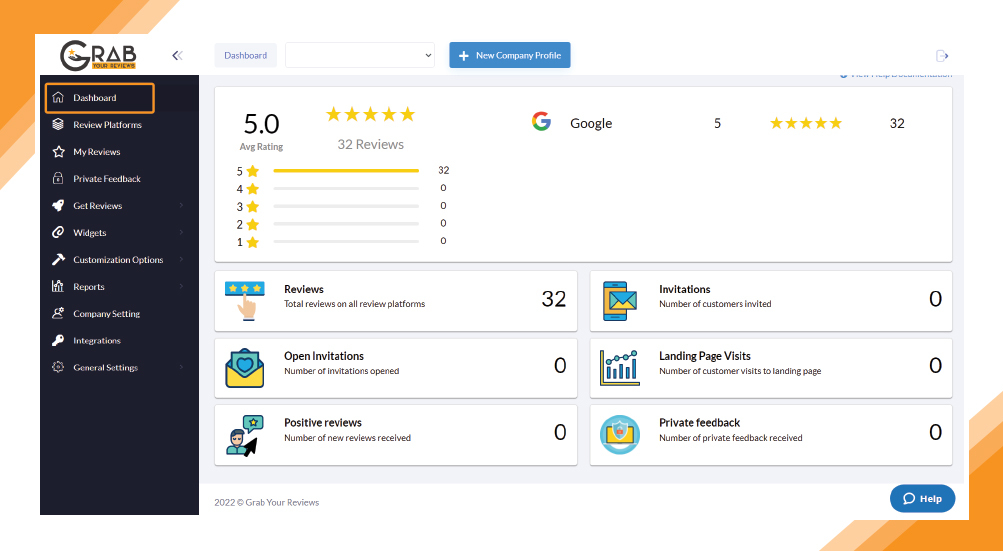
The Grab Your Reviews dashboard is where you will be able to see your business profile(s) and navigate to the other features available to your account.
The first section of the dashboard screen shows you the total number of platforms connected to your account with the number of reviews collected on particular platforms and an average star rating of the individual platforms.
https://embed.getsmartcue.com/IC14LUI3
<div
    style="position: relative; padding-bottom: calc(62.5% + 41px); height: 0; width: 100%; z-index: 9"
  >
    <iframe
      src="https://embed.getsmartcue.com/IC14LUI3"
      frameborder="0"
      loading="lazy"
      webkitallowfullscreen
      mozallowfullscreen
      allowfullscreen
      style="position: absolute; top: 0; left: 0; width: 100%; height: 100%;"
      title="Showcase 21/05/23, 10:40"
    ></iframe>
  </div>
Average rating: The total count of reviews from all the connected platforms with their star ratings will be calculated to an average rating.
The second section of the dashboard screen brief you about:
Reviews: Total number of reviews fetch by Grab Your Reviews from all connected platforms.
Invitations: The number of review invitations has been sent to your customers.
Open Invitations: The number of review invitations is opened by your customers.
Landing Page Visits: The number of customers who visited your landing page. (https://app.grabyourreviews.com/yourcompany).
Positive Reviews: Total number of positive new reviews collected by Grab Your Reviews.
Private Feedback: The count of negative reviews customers trying to post using your Review Page URL.
